DistrictWorks by Back Eddy Engineering

Every stormwater facility you own. What condition it’s in. What it will cost.

DistrictWorks puts your district’s stormwater infrastructure on one map: current condition, inspection history, and a 20-year capital forecast your board can actually use. Built by Colorado stormwater engineers.
DistrictWorks map dashboard showing stormwater assets with condition markers over aerial imagery
Engineer-built. Designed by a Colorado PE, not a software company.
Front Range calibrated. Lifecycle forecasts tuned to local soils and climate.
Board ready. Reports your board reads in one sitting.

Most districts can’t answer three basic questions about their stormwater facilities

What do we own?

The inventory lives in a decade of project files, a consultant’s file drawer, and one long-tenured board member’s memory. Nobody has the full picture.

What condition is it in?

Inspections happen, but the records are scattered across PDFs and email threads. Nobody can pull up a facility’s history without an archaeology project.

What will it cost us?

The board finds out about a $180,000 pond rehab when it’s already urgent. No reserve planning, no warning, just a special assessment conversation nobody wanted.

Asset Inventory

Your entire district on one map

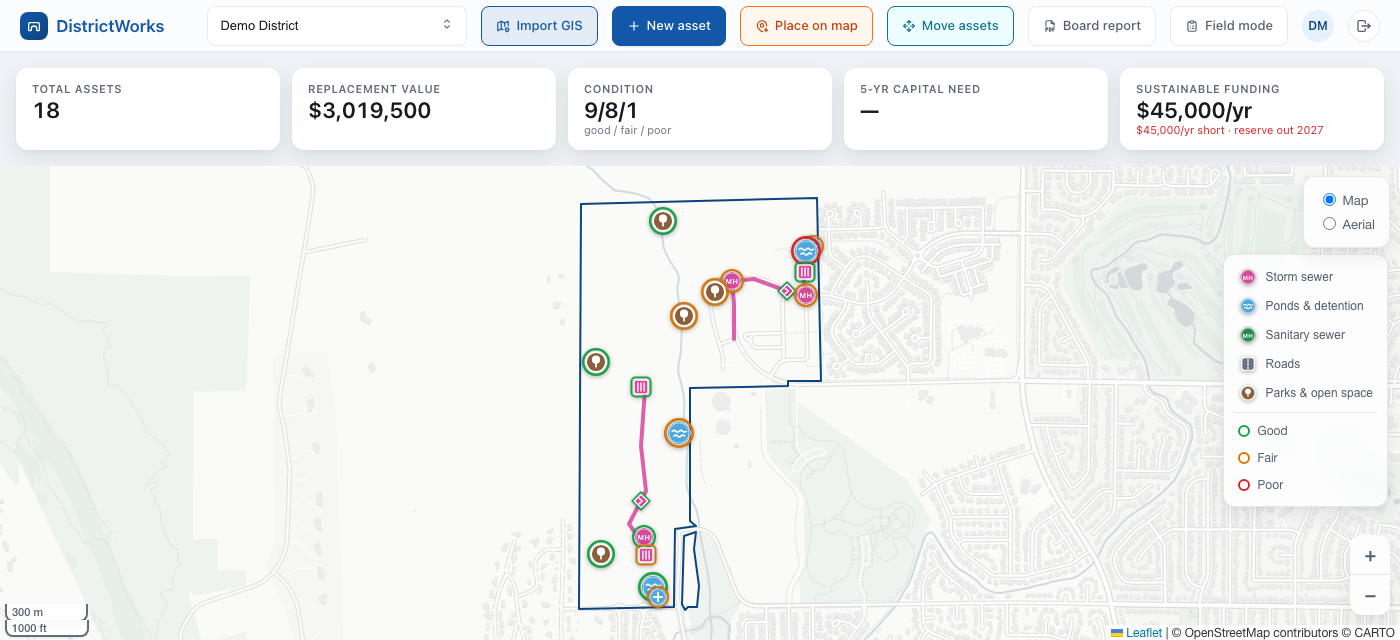
Every detention pond, outfall, inlet, and storm line plotted over aerial imagery with a color-coded condition marker. Click any asset and see its type, age, replacement cost, and full inspection history. If your district has GIS shapefiles, import them directly. If everything lives in spreadsheets, we’ll load it for you.

DistrictWorks dashboard with total assets, replacement value, condition summary, and mapped stormwater facilities
Product preview: a representative Colorado metro district dataset.
Inspections

Log inspections from a phone, in the field

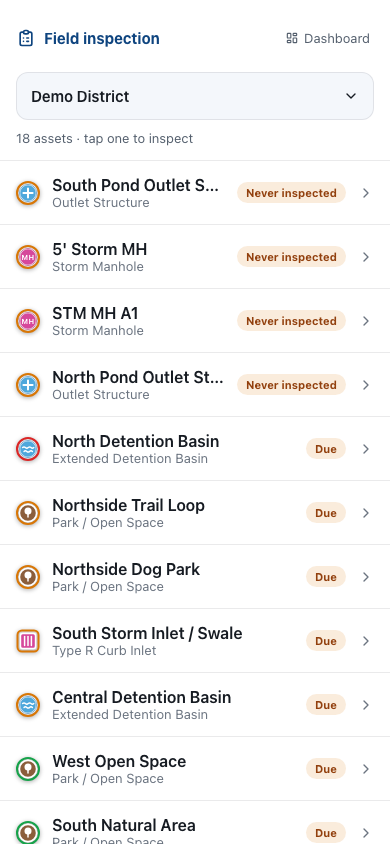
Field mode sorts your assets by inspection priority, then walks you through each one: tap a condition rating, snap photos (GPS location captured automatically), and save. The asset record, the map marker, and the capital forecast all update the moment the inspection is logged. No transcribing notes back at the office.

DistrictWorks field inspection mode on a phone showing condition rating buttons and photo capture
Product preview: field inspection mode.
Capital Forecasting

A 20-year forecast your reserve fund can plan against

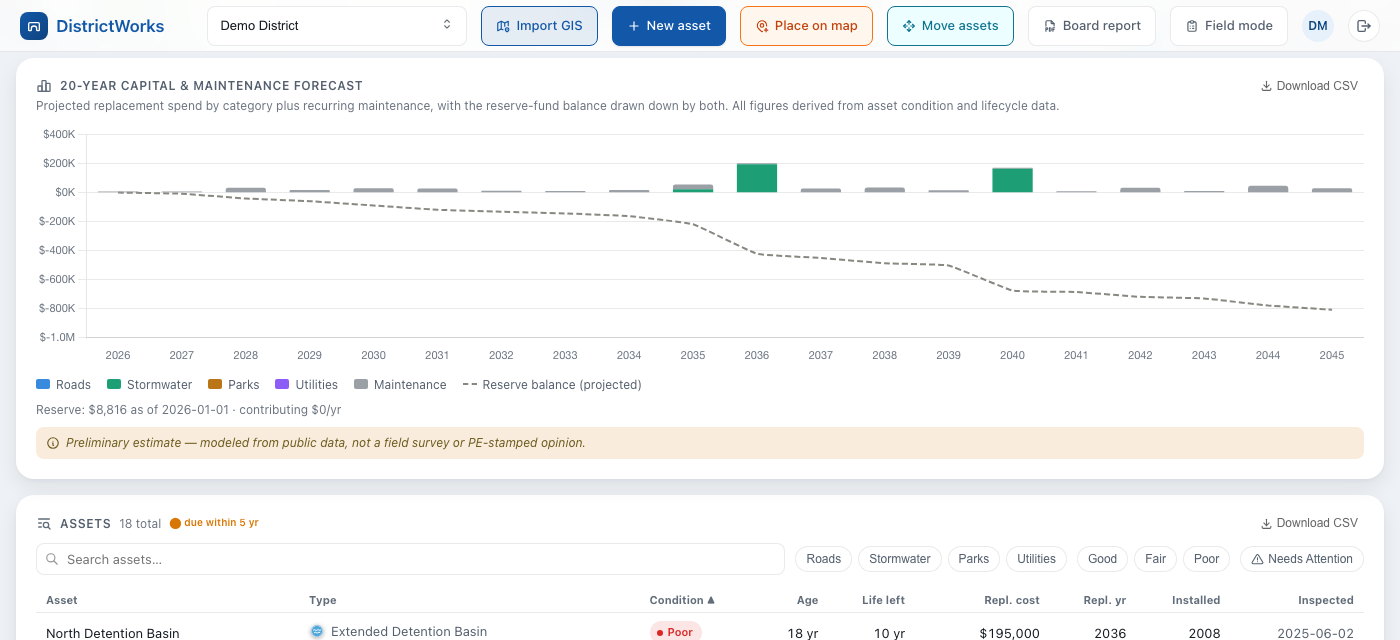
DistrictWorks projects replacement and maintenance spend for every asset across a 20-year horizon, then draws your reserve balance against it. You see the funding gap years before it becomes a crisis. Each number traces back to the asset’s condition, age, and lifecycle profile. No black boxes.

20-year capital replacement forecast chart with projected reserve fund balance line
Product preview: capital forecast with projected reserve drawdown.
Board Reporting

Board-ready reports in one click

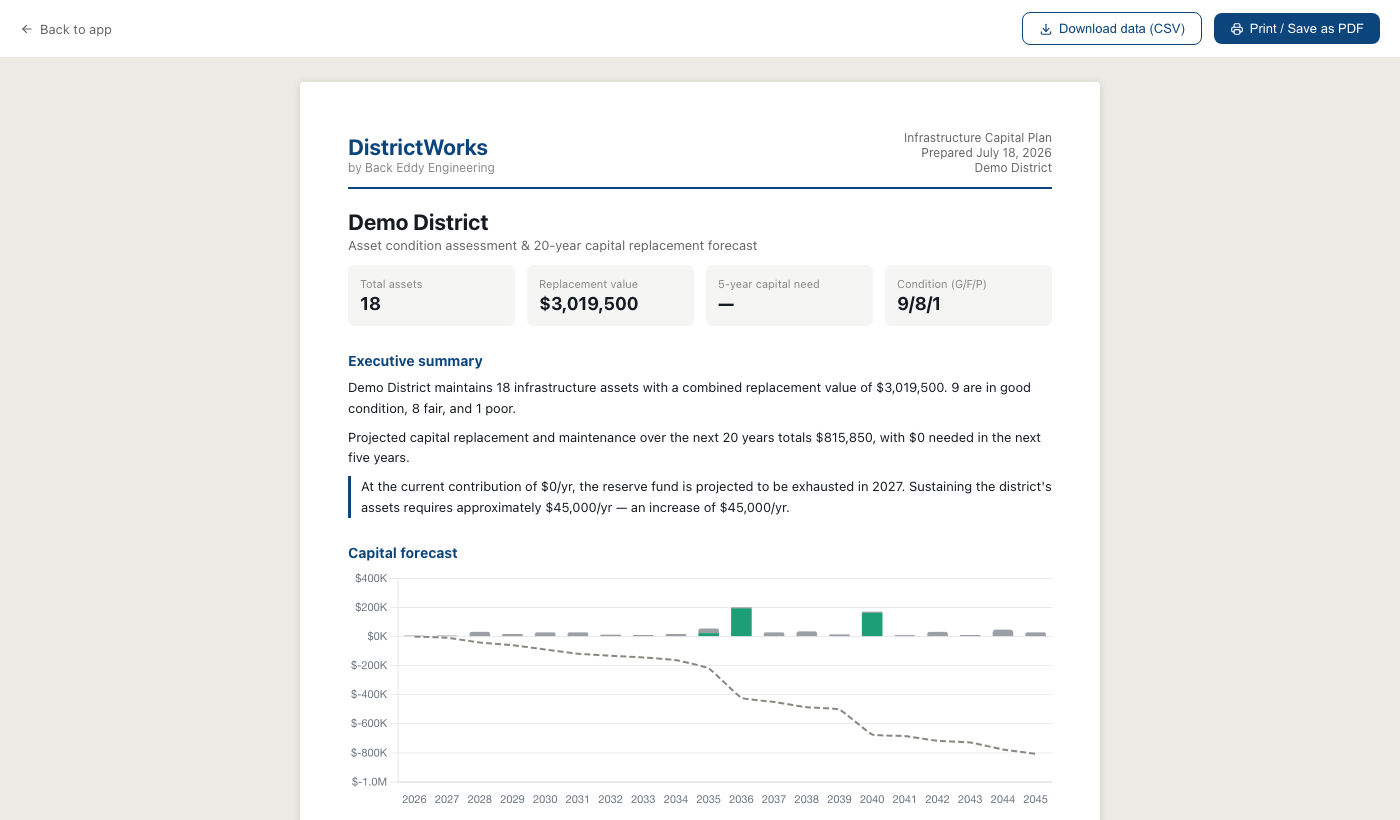
A print-ready report with the asset inventory, condition summary, capital forecast, and recommended maintenance. Save it as a PDF for the board packet or export the tables to Excel. Board members can also get read-only logins and look at the live data themselves.

DistrictWorks board report showing asset inventory table with condition ratings and replacement costs
Product preview: the board report, ready for the packet.
The Engineering Underneath

Forecasts calibrated to the Front Range, signed by an engineer

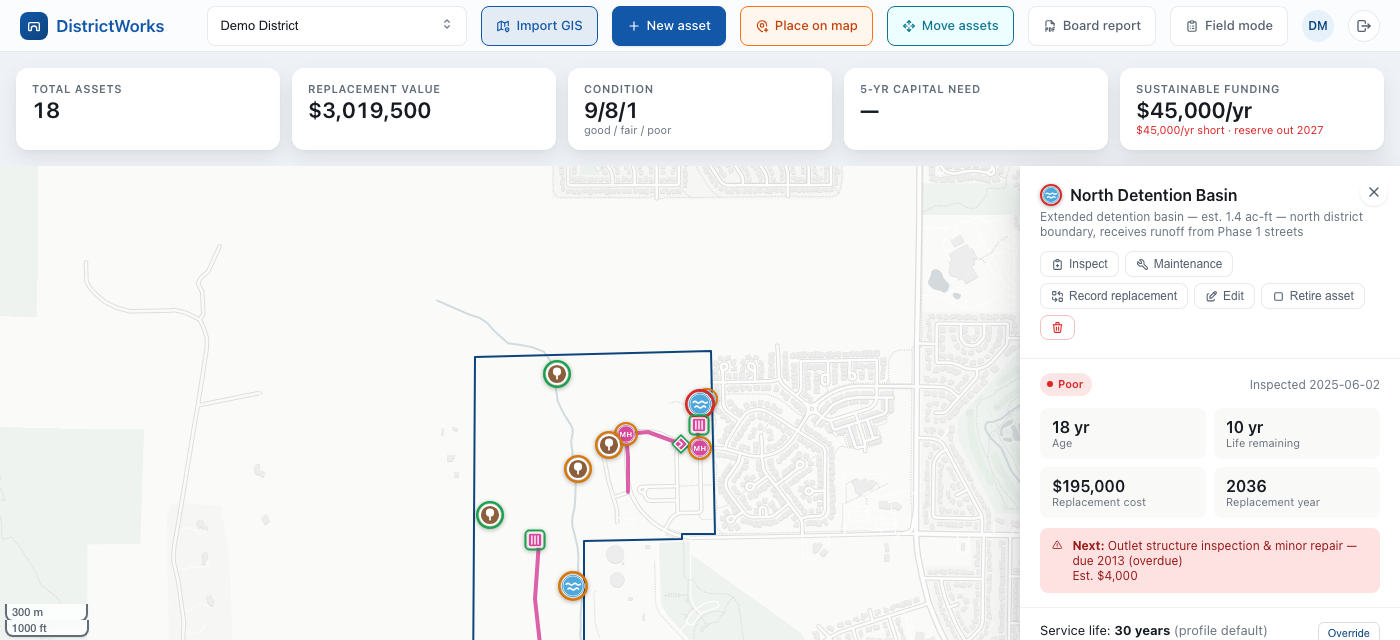
Generic asset software applies national averages. DistrictWorks uses lifecycle profiles calibrated to Front Range conditions: expansive clay soils, freeze-thaw cycles, and intense summer storms. Every service life and maintenance interval is set and reviewed by a Colorado PE, and every forecast can be traced back to the data behind it. When your board asks “where did this number come from,” there’s an answer.

DistrictWorks asset detail panel showing condition, remaining life, replacement cost, and overdue maintenance flag
Product preview: asset detail with remaining life, replacement year, and overdue maintenance flagged.

The same platform tracks the rest of your district

Roads, parks, and other district assets Stormwater is where DistrictWorks starts, but the inventory, inspections, and capital forecast work the same way for pavement, parks, and anything else your district maintains.
DOLA compliance calendar Statutory filing deadlines for Colorado special districts, tracked in-app with due-date countdowns and overdue flags. No more tracking DOLA deadlines by memory.

Built for the organizations that own stormwater infrastructure

Special Districts

Metro & Special Districts

Your district accepted these facilities from the developer years ago. DistrictWorks gives you the defensible inventory, inspection record, and capital plan that acceptance implied.

Building a district asset inventory →
Municipalities

MS4 Municipalities

When the auditor asks for your post-construction facility records, the answer is a filtered export, not a week of digging. Inventory, inspections, and photos in one place.

Asset management for MS4 programs →
HOAs

HOA Boards

That detention pond behind the clubhouse is the association’s legal responsibility. Know its condition, its inspection history, and what the reserve fund should be carrying for it.

Why your pond is the board’s liability →

Built by engineers, not a software company

Back Eddy Engineering spends its days inspecting stormwater facilities and managing compliance programs along the Front Range. DistrictWorks exists because we kept watching the same failure: good districts with no usable record of what they own, blindsided by replacement costs their engineer saw coming years earlier.

The big asset management platforms are built for cities with GIS departments and six-figure software budgets. Your district needs the same answers without the enterprise overhead. That’s the product we built.

It also pairs naturally with our consulting. If you want Back Eddy performing your inspections, the records land directly in your DistrictWorks account. If your own staff does the inspections, the software guides them through it. Either way, your data is yours.

Frequently asked questions

How is DistrictWorks priced?

Annual subscription based on the number of assets your organization manages. No per-user fees, so your board, your manager, and your inspector can all have logins. Request a demo and we’ll give you a real number for your district.

We track everything in spreadsheets today. How hard is it to move over?

We do the initial data load for you as part of onboarding. Send us your spreadsheets, drainage reports, or as-builts and we’ll build your asset inventory. If your district has GIS shapefiles, DistrictWorks imports those directly.

Who enters the inspection data?

Anyone you authorize. Your own staff can log inspections from a phone in the field, or Back Eddy can perform the inspections and the records land in your account. Many districts do both.

Does DistrictWorks satisfy MS4 record-keeping requirements?

It maintains the documentation an MS4 post-construction program needs: a facility inventory, dated inspection records with photos, condition ratings, and maintenance history, all exportable when an auditor asks.

Can board members see the data without being able to change it?

Yes. Viewer logins are read-only. Board members see the map, the condition ratings, and the capital forecast but can’t edit anything.

What’s the contract commitment?

Annual, and your data is always yours. Export everything to Excel or CSV at any time, including if you leave.

See DistrictWorks With Your Facilities in Mind

A 30-minute walkthrough using your facility types as the example, then sandbox access to explore on your own. No pressure, and if it’s not the right fit we’ll say so.

Request a Demo